


Options Chain Guide
العربيةLearn how to select an expiry, compare calls and puts, read liquidity and Greeks, and inspect a contract before using it in a strategy.
A view on the stock is only the starting point: you still need a suitable contract. The chain puts expiries, strikes, prices and activity side by side so you can compare time remaining, trading costs and liquidity before choosing what to investigate.
Use the page controls and filters
Symbol and expiry
Search for the symbol, then choose an expiry tab. Changing the expiry changes the contracts: check it before comparing quotes or saving a contract.
Strike range and Call / Put
Widen or narrow the strike range around the stock price. Show calls, puts or both to compare the same strike on either side.
Columns and Greeks
Use the column menu to show relevant data. The Greeks switch changes visibility when those measures are available to your plan; hiding a column does not change the contract.
Volume and OI charts
Compare activity and open interest across strikes, or collapse the charts for more table space. A concentration is not a promise that price will stop at that strike.
Saved contracts and refresh
Saved-only narrows the results to saved contracts. If the table appears empty, check that switch and the expiry. Watch the refresh status before reading quotes.
Fields and concepts
Expiry and days to expiration
Define how much time remains. Short-dated contracts react more sharply to price and time decay.
Strike and moneyness
Compare the strike with spot price to distinguish in-the-money, at-the-money, and out-of-the-money contracts.
Bid, ask, and spread
Show executable quote context. A wide or stale spread can materially change entry and exit cost.
Volume and open interest
Volume describes current-session activity; open interest is the outstanding position count from the latest available update.
Implied volatility
Represents the volatility embedded in the option price, not a guaranteed forecast of realized movement.
Greeks
Delta, gamma, theta, and vega estimate sensitivities under a model and change as price, time, and volatility change.
Review workflow
- Enter the underlying symbol and confirm the displayed spot price and quote timestamp.
- Choose an expiration that matches the analysis horizon; compare nearby expirations instead of selecting by premium alone.
- Use strike, call/put, saved-contract, and liquidity controls to reduce the table to relevant contracts.
- Open the contract chart and inspect spread, volume, open interest, volatility, and recent trading activity together.
- Recheck the quote before any decision because options prices, Greeks, and availability can change quickly.
Useful supporting context
- A consistently quoted bid and ask with a spread appropriate for the contract price.
- Volume and open interest that support the intended position size.
- An expiry and strike selected for a defined horizon and risk profile.
- Agreement between the chain data, underlying chart, and event calendar.
Cautions
- A last price outside the current bid–ask range.
- Large percentage spreads or contracts with little activity.
- Upcoming earnings, dividends, or corporate actions not included in the initial thesis.
- Using a Greek as a fixed prediction rather than a changing model sensitivity.
Risk and limitations
When does the UOA unusual-activity badge appear?
The badge requires volume of at least twice open interest, at least 10 open contracts, and a calculable ratio. It compares trading volume with the latest available OI, not OI between two dates.
For example, volume of 300 and OI of 100 produce a ratio of 3 and meet the rule. Volume of 30 and OI of 5 do not qualify despite the higher ratio, because open interest is below the minimum.
In the chain, choose the symbol and expiry, then compare a contract's UOA badge with its volume and OI columns. Unusual summarizes qualifying contracts. The OI radar counts qualifying contracts per stock; do not confuse that count with their traded volume.
Related guides
Summary cards and table structure
Calls appear on one side, puts on the other, and strike sits in the center so both sides can be compared at the same price level.
| Item | Meaning |
|---|---|
| Call Vol / Put Vol | Total traded contracts by side. An imbalance can reflect directional interest or hedging, not intent by itself. |
| Unusual | Count of contracts meeting the page's unusual-activity rules; open each row to inspect why it qualified. |
| Calls / Strike / Puts | The mirrored layout keeps call and put liquidity, price, and activity aligned by strike. |
Complete column reference
| Column | Meaning |
|---|---|
| IV | Implied volatility embedded in the contract price; it is not a guaranteed forecast. |
| Vol | Contracts traded during the current session. |
| OI | Outstanding contracts from the latest available open-interest update. |
| Bid / Ask | Displayed buy and sell quotes; their difference is the spread and affects execution cost. |
| Last | Most recent reported trade, which can sit outside the current bid-ask range. |
| Chg% | Contract-price change versus the prior close. |
| Delta | Estimated contract-price sensitivity to a one-dollar move in the underlying. |
| Gamma | Estimated rate at which delta changes; commonly largest around at-the-money strikes. |
| Theta | Estimated daily time decay under the model. |
| Vega | Estimated sensitivity to a one-point change in implied volatility. |
Expiry strip and practical use
- Each expiry tab shows a date and days to expiration; always match it to the contract under review.
- 0DTE contracts can have extreme gamma and time-decay sensitivity and require separate risk treatment.
- Weekly expiries offer more dates but can have uneven liquidity.
- Standard monthly expiries often carry deeper open interest, but verify the actual chain.
- Compare volume with open interest, inspect strike concentration, and use Greeks to quantify direction, decay, and volatility exposure.
Visual walkthrough of the options chain
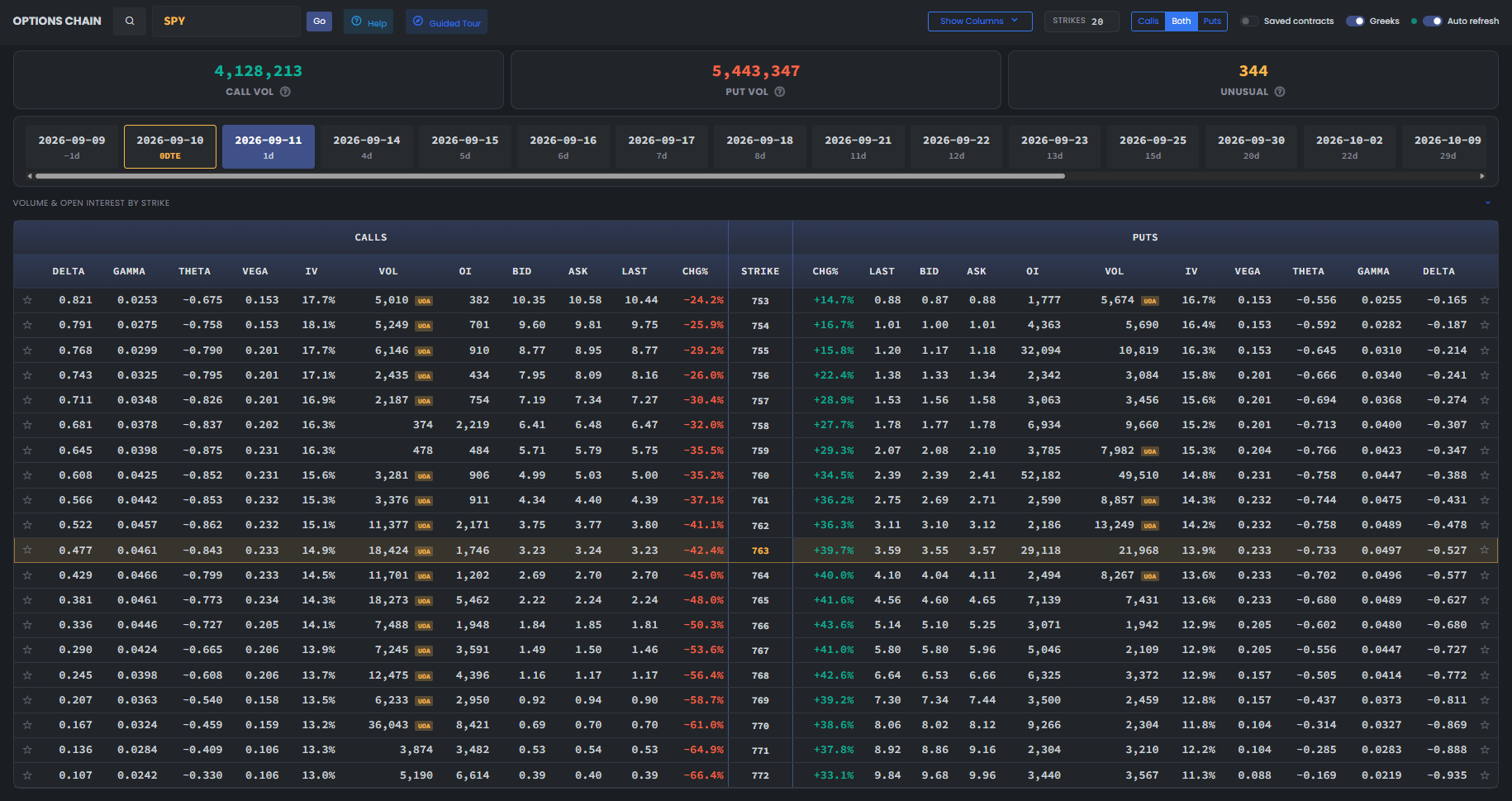
This live-page image shows the controls and columns that should be read together. Values change with the symbol, expiry, session, and data refresh.
Volume and open interest by strike
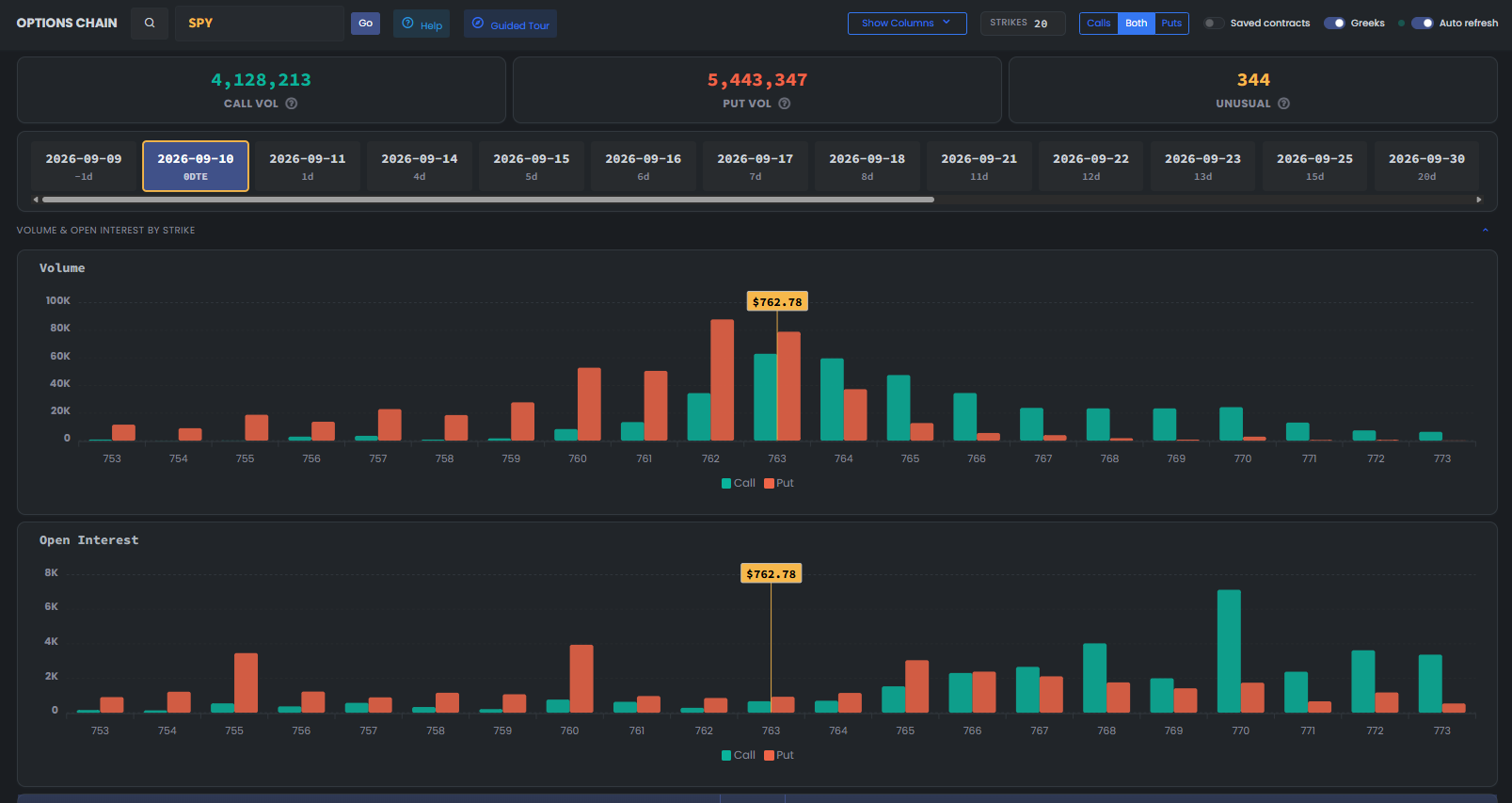
The upper chart compares call and put trading volume at each strike. The lower chart compares open interest. Volume describes trading activity, while open interest counts outstanding contracts at the latest available update. The yellow line marks the underlying price in this capture. Choose the symbol and expiry first, then compare concentrations around that price. More calls alone do not establish buying intent, and more puts alone do not establish selling intent.
- Start with the symbol, strike-count control, Calls/Both/Puts view, and auto-refresh state before reading the table.
- Use the expiry strip to choose the exact contract date; the DTE label distinguishes 0DTE and short-dated contracts from later expiries.
- The summary cards compare total call volume, total put volume, and the count of contracts flagged as unusual for the selected view.
- Read each strike horizontally: call IV, volume, OI, bid, ask, last, and change sit to the left; the matching put fields sit to the right.
- A UOA badge means the row met the product's unusual-activity rule. It does not reveal whether the trade opened or closed a position.
- Before selecting a contract, compare spread width, tradable size, IV, DTE, and the underlying chart; high volume alone is not enough.
Page components explained
Choose the underlying stock
Enter the stock symbol, then choose an available expiry. Every row belongs to that stock, expiry and strike; confirm all three before comparing prices.
Expiry and strike range
Expiry tabs change the contracts you see. The strike range focuses the table around the stock price; call/put controls change which side is displayed. Hidden rows are outside the view, not unavailable contracts.
Read an options contract
Match the call/put type, strike and expiry before comparing contracts. Bid and Ask are quotes; Last is a past trade and may be old. Volume counts trading activity, while open interest counts outstanding contracts. Neither alone reveals whether positions are being opened or closed.
Price sensitivity and volatility
Show Greeks to compare how the contracts respond to stock-price changes, time and volatility. These values change; they are not fixed promises about an option's future price.
Volume and open interest charts
Compare trading activity with outstanding positions across strikes. A concentration identifies where activity sits; it does not reveal the intent of every position.
Your saved selection
Watchlist filters restrict results to your saved underlying stocks. Saved contracts restrict them to individual option contracts you bookmarked. These are different selections; a stock can have many strikes and expiries.
Automatic refresh
Refresh checks for new readings. It does not make an old source current. Check the reading's timestamp and any warning before using it.
Language
Use the flag to switch the interface language. Check the currency shown on subscription and payment pages after changing language; trading symbols keep their original spelling.
Light and dark mode
Choose the appearance that makes text and chart details comfortable to read. Changing the theme affects the display, not the underlying data or signals.
Page layout
Use this control to change the available page layout. It changes how much space the interface uses, not the meaning of the displayed values.
Fullscreen
In the signed-in app, expand the site to gain more room for charts and tables. Use the control again or Escape to leave browser fullscreen.
Notification bell
Review recent notifications and their timestamps here. The badge counts unread notifications; it is not a count of unreviewed trading opportunities. Delivery channels and rules are managed in alert subscriptions.
Account menu
Open account settings, subscription details and other personal links here. Use sign out when you finish on a shared device.