


Options Confluence Guide
العربيةUnderstand how Exelza combines options flow, contract momentum, price structure, and related evidence without turning agreement into certainty.
Video walkthrough
Watch how to read a confluence signal (12 min) Watch on YouTube
One tool may show strong activity while another disagrees. Confluence brings the contributing readings together so you can see why a symbol attracted attention and where the evidence conflicts. Read the components as well as the overall score.
Use the page controls and filters
Search and narrow results
Search the symbol and use direction, minimum score, radar and period filters. Check active filters if a previously visible symbol disappears.
Read the table
Read score and direction alongside contributing tools. Agreement between different data sources differs from the same observation repeated in several places.
Open details and charts
Open related symbols and contracts to compare activity time and price. Use the guided tour to learn where page components are located.
Refresh and follow up
Switch auto-refresh on or off as needed. Recheck timestamps and components when returning; a previous agreement can change.
Fields and concepts
Confluence score
Summarizes configured evidence; it is not a calibrated success probability.
Contributing sources
Identify which data families produced the observation and whether any expected source is absent.
Direction and conflicts
Show the aggregate label and any evidence that disagrees with it.
Time window
Defines which observations were grouped; evidence from different horizons may not describe one setup.
Contract details
Expose the options instruments behind flow or momentum components.
Freshness and completeness
Distinguish current complete evidence from partial, delayed, or unavailable inputs.
Review workflow
- Start with the contributing-source list rather than the total score.
- Open each source and confirm its timestamp, instrument, and direction.
- Separate genuinely independent evidence from several metrics derived from the same trade or price move.
- Review the underlying chart, contract liquidity, volatility, and events for the same horizon.
- Document conflicting evidence and the condition that would invalidate the combined interpretation.
Useful supporting context
- Several current sources that measure different aspects of the setup.
- Evidence referring to the same underlying, horizon, and directional question.
- Transparent components that can be verified on their source pages.
- No hidden dependence on one unusually large print or candle.
Cautions
- A high score built from correlated derivatives of one event.
- Missing or stale sources presented beside current evidence.
- Conflicting horizons, such as intraday flow paired with a long-dated thesis.
- Reading agreement as a guarantee instead of a structured research queue.
Risk and limitations
Related guides
Signal-source reference
| Source | What it contributes |
|---|---|
| Stock Radar | Algorithmic technical signals such as squeeze, MACD, and breakout conditions. |
| Options Flow | Sweeps, whales, premium activity, and execution-side context. |
| Block Trades | Large reported stock transactions that can reflect accumulation, distribution, hedging, or benchmark activity. |
| News | Company and market catalysts that can support or contradict the setup. |
| Options Chain | Put-call activity, open-interest concentration, and related chain context. |
| Multi Contract | Several contracts aligning in activity and momentum on the same underlying. |
| Consecutive Flow | Repeated whale or block options events on the same symbol during the recent window. |
Score bands and card fields
| Field | Meaning |
|---|---|
| 50-59 | Early or weak agreement; suitable for investigation rather than conviction. |
| 60-69 | Moderate agreement across several inputs. |
| 70-79 | Strong modeled alignment. |
| 80+ | Highest modeled agreement; it is not probability of profit. |
| Direction | Bullish or bearish model label. |
| Aligned / Mixed | Whether supporting sources agree or contain material conflicts. |
| Source chips | Each contributing source and its individual strength. |
| Call buys / Put buys / premium balance | Buy-side options totals around the signal; they can include hedges and structures. |
Suggested trade structure
| Field | Meaning |
|---|---|
| Strategy | A single-call or single-put starting structure tied to the modeled direction. |
| Strike / Expiry | Suggested contract location and duration; verify availability, liquidity, and event exposure. |
| Signal price | Contract price at the resolved reference candle, not a guaranteed executable quote. |
| IV Rank | Relative implied-volatility position; it needs event and term-structure context. |
| Liquidity | Execution-quality score intended to highlight harder-to-trade contracts. |
Practical use
- Start with higher scores, then inspect whether the evidence is genuinely independent.
- Prefer Aligned when seeking cleaner agreement, but investigate any Mixed conflict rather than hiding it.
- Open every important source chip and compare its timestamp and direction.
- Use suggested structure as a research starting point, not a replacement for sizing and invalidation.
- Use the sidebar to find repeated symbols, then check whether repetition comes from new evidence or duplicates.
Visual walkthrough of Options Confluence
The confluence page is an evidence board. The screenshot shows how filters, summary cards, source chips, alignment, and a candidate structure fit together.
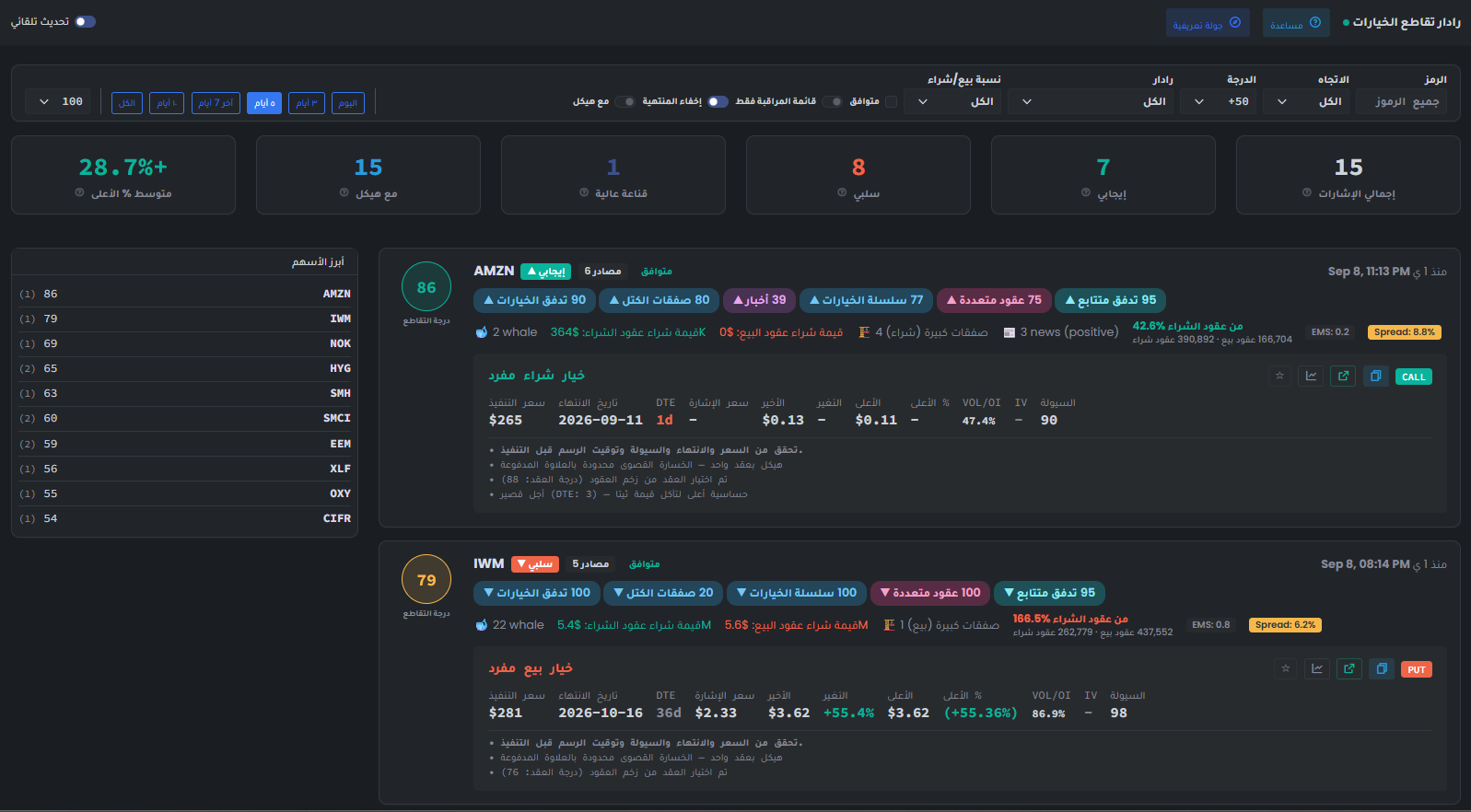
- Filter by symbol, direction, minimum score, radar source, put/call range, alignment, watchlist, expiry, and structure availability before comparing candidates.
- The summary row describes only the filtered set: total signals, bullish and bearish counts, high-conviction count, structures, and observed Avg Max %.
- The circular confluence score is the combined ranking. The source count tells how many evidence families contributed, while Aligned or Mixed describes directional agreement.
- Source chips expose the contributing evidence and its component score, such as Stock Radar, Options Flow, Block Trades, Options Chain, or Consecutive Flow.
- The detail line adds flow counts, premium balance, put/call concentration, EMS, and spread. Check for duplicated evidence before calling the setup independent confirmation.
- The structure card is a candidate expression with strike, expiry, DTE, signal price, liquidity, and follow-through. Validate live price, spread, expiry, and maximum loss yourself.
Page components explained
Find overlapping evidence
Choose the stock, direction, radar and minimum score you want to compare. Alignment restricts the displayed agreement; it does not prove that the inputs are independent or guarantee a trade outcome.
Read a confluence card
Read which signals agree and which disagree, then inspect the option structure and its expiry if available. Missing structure is missing context, not confirmation. Several signals from one move can overlap.
Summary and most frequent stocks
These counts summarize the selected results. A frequently appearing stock deserves inspection, but frequency and a strong label are not measured chances of success.
Your saved selection
Watchlist filters restrict results to your saved underlying stocks. Saved contracts restrict them to individual option contracts you bookmarked. These are different selections; a stock can have many strikes and expiries.
Automatic refresh
Refresh checks for new readings. It does not make an old source current. Check the reading's timestamp and any warning before using it.
Language
Use the flag to switch the interface language. Check the currency shown on subscription and payment pages after changing language; trading symbols keep their original spelling.
Light and dark mode
Choose the appearance that makes text and chart details comfortable to read. Changing the theme affects the display, not the underlying data or signals.
Page layout
Use this control to change the available page layout. It changes how much space the interface uses, not the meaning of the displayed values.
Fullscreen
In the signed-in app, expand the site to gain more room for charts and tables. Use the control again or Escape to leave browser fullscreen.
Notification bell
Review recent notifications and their timestamps here. The badge counts unread notifications; it is not a count of unreviewed trading opportunities. Delivery channels and rules are managed in alert subscriptions.
Account menu
Open account settings, subscription details and other personal links here. Use sign out when you finish on a shared device.