


GEX Dealer Positioning Guide
العربيةRead dealer gamma positioning, Zero Gamma, walls, DEX, expiry windows, and signal states before building an options trade plan.
Knowing the stock's direction is not enough: nearby option-positioning levels may also matter. GEX maps estimated gamma exposure and key levels so you can study where movement may slow or accelerate. Match the map to your expiry selection and data time; the levels change with the market.

Read the header cards
Net GEX
The aggregate modeled gamma regime. Check its sign and magnitude, then compare with price location.
Analysis Spot
The underlying price used to build the model. Compare it with the live spot and source age.
Zero Gamma
The modeled transition level between positive and negative gamma regimes; price can be unstable near it.
Max Gamma
The strike with the largest modeled gamma concentration. It can behave like an attractor near expiration, but may move.
Put Wall
The largest modeled put concentration. Treat it as a candidate support area, not a guaranteed floor.
Call Wall
The largest modeled call concentration. Treat it as a candidate resistance area, not a guaranteed ceiling.
Net DEX
A directional delta-exposure estimate. Positive and negative readings add context to the signal state.
Use the page controls and filters
Current and previous readings
Start with data status and timestamp. The page may retain the last reading that passed data checks when a new reading is unavailable; visible numbers do not make it a current signal. Read paused or incomplete-data notices before interpreting BUY or SELL.
Exact expiries or rolling windows
Month and expiration selections determine which contracts contribute to the map. A rolling period such as This Week or This Month is a different selection. Match the basis before comparing maps.
Advanced search basis
Choose the page's selected expiries or a rolling window in the search dialog. Exact-expiry search accepts one market date; use a rolling window for multiple dates. Check the selection description next to the buttons.
Results and search limits
Search uses the last saved reading per symbol per day and returns readings with valid quality and an available signal. Results are not every intraday signal or every stock. If results are truncated, narrow the filters before drawing conclusions.
Price near a level
Choose Call Wall, Put Wall or Zero Gamma and a distance percentage. With this filter, nearest results sort first. Distance uses saved Analysis Spot, which may differ from the current price.
Open a result and compare history
Opening a symbol restores its result date and expiry context. Check the historical badge and return to current data when needed. Historical comparison uses a rolling expiry window across days; missing days are not zero-valued readings.
Signal colors
The signal-name color identifies its family while BUY or SELL describes its bias. A green signal family may therefore have a bearish bias. Read the conditions rather than treating color as a trade instruction.
Read the strike chart
- Each horizontal bar belongs to one strike; longer bars represent a larger modeled concentration.
- Net shows the combined gamma result. Call / Put separates call and put contributions.
- DEX markers add directional context at each strike.
- The chart marks Call Wall, Put Wall, Zero Gamma, and current spot so the remaining space is visible.
- This Week, Next Week, This Month, and Next Month are different maps. Match the chart window to the contract expiry.
Advanced GEX search and historical comparison
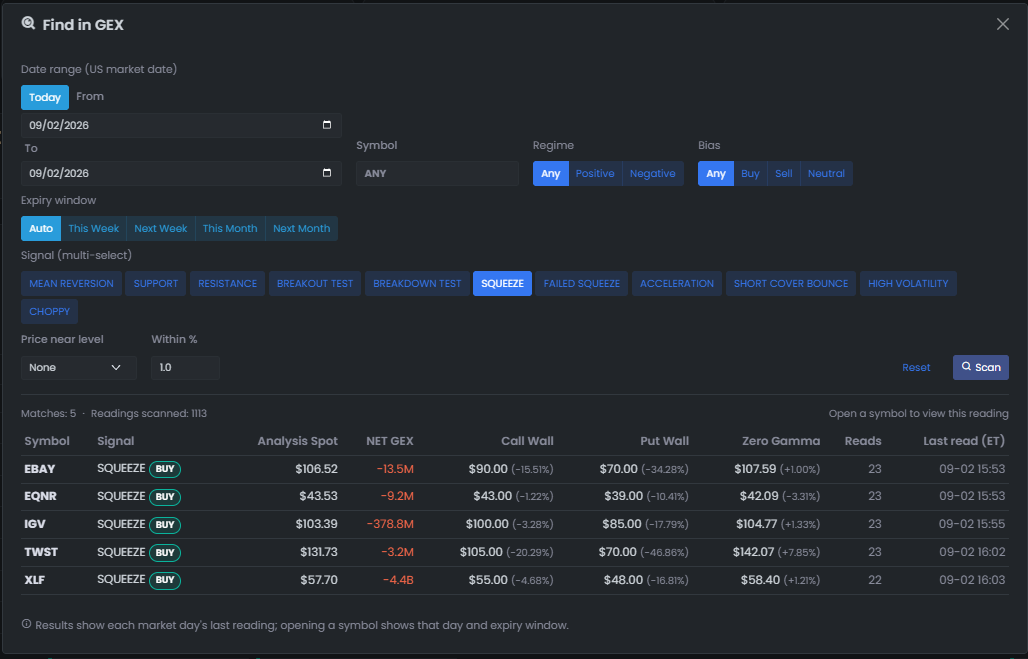
Find in GEX searches saved daily readings rather than only the symbol currently open. Build the broadest useful filter first, scan, then narrow the result set without treating a model label as a trade command.
| Filter | How to use it | Why it matters |
|---|---|---|
| Date range | Use Today for the current US market date, or From / To for a historical window. | Prevents comparing readings from different sessions without noticing the date context. |
| Symbol | Leave the symbol blank for the available universe, or enter a symbol prefix to narrow the search. | Separates market discovery from single-symbol review. |
| Regime | Choose Any, Positive, or Negative Net GEX. | Narrows the modeled hedging environment before directional interpretation. |
| Bias | Choose Any, Buy, Sell, or Neutral. | This is a model classification for filtering, not an order or recommendation. |
| Expiry window | Use Auto or select This Week, Next Week, This Month, or Next Month. | Keeps the result map aligned with the contract horizon you intend to review. |
| Signal | Select one or more signal states; leave all unselected when the signal should not restrict the scan. | Lets you compare repeated states such as SQUEEZE, SUPPORT, or HIGH VOLATILITY. |
| Price near level | Choose a modeled level and set Within % to define the maximum distance from it. | Finds readings where spot was near a wall or Zero Gamma rather than merely sharing a label. |
A practical scan workflow
- Start with the date range, regime, and expiry window that match the question you are testing.
- Add one signal family, then scan and note both Matches and Readings scanned.
- Use Price near level only when proximity is part of the thesis; an excessively small percentage can hide useful cases.
- Read Analysis Spot, Net GEX, walls, Zero Gamma, source time, and read count together before opening a result.
- Open the symbol to restore that historical reading and its expiry context, then compare it with the live market before acting.
- Use Reset before starting a materially different question so an old hidden filter does not carry forward.
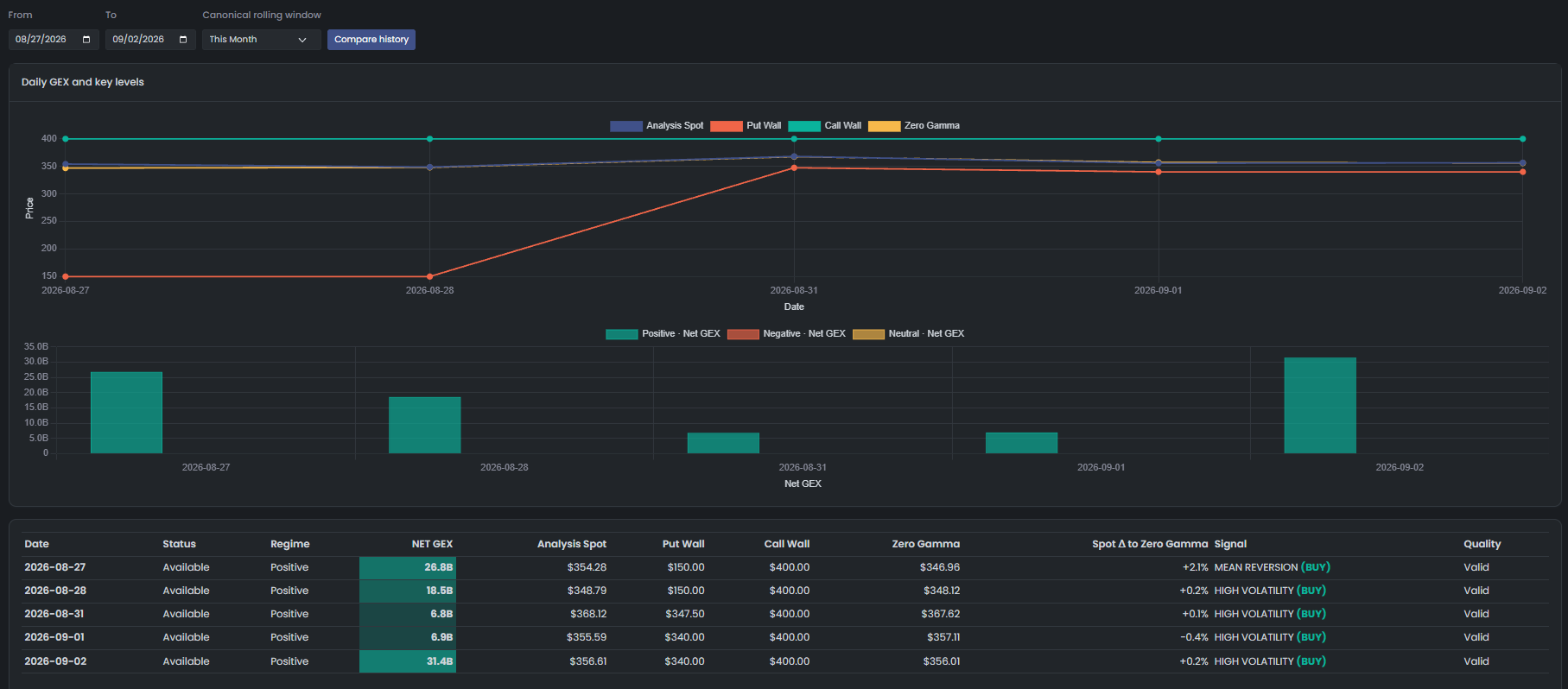
Compare the selected reading through time
After finding a candidate, use the history comparison to see whether the walls and regime persisted, migrated, or flipped. Select From / To and a canonical rolling window, then compare the chart with the exact daily rows below it.
Pre-trade review workflow
- Check source age and whether the page is live or based on the previous session.
- Classify the regime from Net GEX, then locate spot relative to Zero Gamma.
- Use Net DEX and the signal card to form a provisional directional bias, not a trade command.
- Select the expiry window that matches the contract being considered.
- Measure the space to the nearest wall in the intended direction.
- Define entry only after level confirmation, target the next relevant level, and invalidate beyond the level that formed the thesis.
- Recheck after the open and after material price movement because walls, Greeks, and source freshness change.
Combine the three options tools
| Tool | Question | Role |
|---|---|---|
| Contract momentum | What is moving now? | Find contracts whose price and activity are accelerating. |
| Options flow / confluence | Does notable activity accompany the move? | Look for independent evidence such as repeated or large activity. |
| GEX | Where is the trade on the map? | Check regime, levels, room to the next wall, and invalidation. |
Signal-state reference
| State | Typical model conditions | Bias | Meaning |
|---|---|---|---|
| HIGH VOLATILITY | Spot is very close to Zero Gamma | Direction follows DEX | A transition zone; wait for resolution. |
| MEAN REVERSION | Positive GEX and spot between the walls | Direction follows DEX | Movement may be absorbed inside a range. |
| RESISTANCE | Positive GEX above Call Wall with weak or negative DEX | Bearish | Candidate resistance; dealers may hedge against the rise. |
| BREAKOUT TEST | Positive GEX above Call Wall with positive DEX | Bullish | A breakout test that still requires the level to hold. |
| SUPPORT | Positive GEX below Put Wall with neutral or positive DEX | Bullish | Candidate support; the decline may be absorbed. |
| BREAKDOWN TEST | Positive GEX below Put Wall with negative DEX | Bearish | A support-break test that requires confirmation. |
| SQUEEZE | Negative GEX above Call Wall with positive DEX | Bullish | An amplified upside regime that can reverse sharply. |
| FAILED SQUEEZE | Negative GEX above Call Wall while DEX fades | Bearish | The squeeze may be losing its flow support. |
| ACCELERATION | Negative GEX below Put Wall with negative DEX | Bearish | An amplified downside regime with high reversal risk. |
| SHORT COVER BOUNCE | Negative GEX below Put Wall with positive DEX | Bullish | A potentially fast, short-lived covering bounce. |
| CHOPPY | Negative GEX with spot between the walls | Direction follows DEX | Unstructured volatility; a difficult state for beginners. |
An educational comparison of gamma states
Compare possible movement and the checks each state needs. This is not a measured win-rate ranking and does not establish that one state is more profitable. Greater movement alone does not make a better opportunity.
| State | Signals | What may happen? | What should you check? |
|---|---|---|---|
| Accelerating movement | SQUEEZE ACCELERATION | Hedging may amplify movement in the current direction. | Inspect liquidity, changing price and reversal risk; a late entry changes the risk. |
| Level test | BREAKOUT TEST BREAKDOWN TEST | Movement may continue if price holds beyond the wall. | Watch whether the break holds or returns through the level, and define invalidation. |
| Volatility near zero gamma | HIGH VOLATILITY | Price may move quickly in either direction. | Do not infer direction from the label. Watch price leaving the area and DEX behavior. |
| Range or wall interaction | SUPPORT RESISTANCE MEAN REVERSION | Movement may slow or rebound near the level. | Check price defending the level; a small move may not offset option time decay. |
| Caution states | FAILED SQUEEZE SHORT COVER BOUNCE CHOPPY | Movement may be unstable, short-lived or losing support. | Understand the warning and seek clearer price and level behavior. |
Confirmation matrix
- When momentum, flow activity and GEX agree, review the contract and the complete plan. Agreement does not measure the probability of success.
- Momentum and flow agree but a wall blocks the route: wait for a confirmed break or avoid the trade.
- Momentum appears without independent flow evidence: monitor rather than assuming large participation.
- The GEX map looks attractive but no trigger exists: keep it on watch; a map alone is not a trade.
Common traps
- Entering from a radar alert before checking the nearest wall and remaining reward space.
- Building a directional opinion from GEX first, then searching for evidence that confirms it.
- Reading monthly walls for a weekly contract or treating the header wall as identical to every expiry-window wall.
- Buying calls directly below Call Wall, buying puts directly above defended Put Wall, or ignoring pinning around Max Gamma near expiration.
- Using stale previous-session levels after the market has moved materially.
Risk and limitations
Related guides
Page elements and side classification
| Element | Meaning |
|---|---|
| Header cards | Summarize Net GEX, Net DEX, spot, modeled walls, regime, and source context. |
| Expiry tabs | Change the contract window included in the map; the selected window must match the intended trade horizon. |
| Net / Call-Put | Switch between aggregate exposure and separated call-put contributions. |
| Heatmap / Matrix | Offer alternative views of strike concentration. |
| DEX / OI | Switch the companion panel between modeled delta exposure and open-interest context. |
| BUY / SELL / NEUTRAL | A model classification derived from the current GEX, DEX, walls, and spot relationship; it is not an order. |
Regime and signal reference
| State | Typical interpretation |
|---|---|
| Positive gamma | Dealer hedging is modeled as more movement-absorbing; pinning and mean reversion may be more common. |
| Negative gamma | Dealer hedging is modeled as more movement-amplifying; breakouts and reversals can be sharper. |
| Near Zero Gamma | Transition area where regime confidence is lower and volatility can change quickly. |
| Above Call Wall | Evaluate whether price is rejecting, breaking, or sustaining above the modeled concentration. |
| Below Put Wall | Evaluate whether price is defending, breaking, or accelerating below the modeled concentration. |
| DEX agreement | Directional DEX agreement can strengthen the current model label; disagreement should lower confidence. |
Use with risk controls
- Confirm source age, analysis spot, and live spot before using any level.
- Match the expiry selection to the contract being reviewed.
- Measure available space to the next wall before selecting a target.
- Treat BUY or SELL as a summary of model conditions and require an independent trigger.
- Recalculate the thesis after a large price move, volatility change, or open-interest update.
Visual guide to the GEX and DEX screen
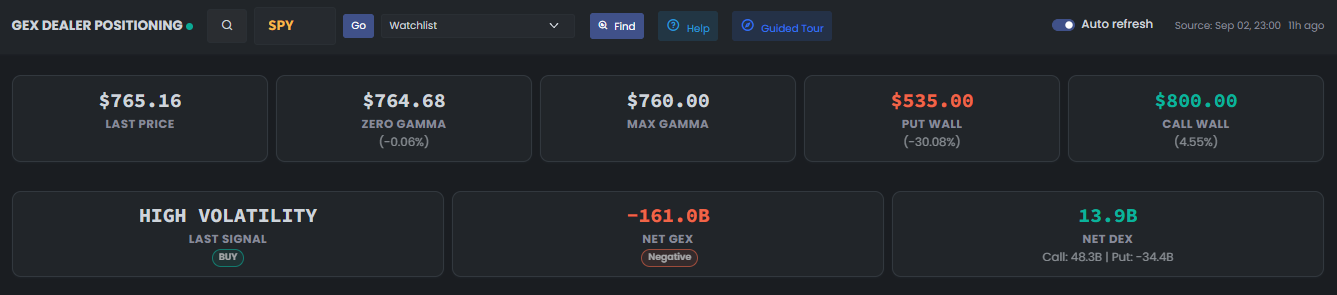
Use the static summary for the headline levels, then play only the short interaction that matches the step you are reading.
Read the headline levels first
Start with Last Price, Zero Gamma, Max Gamma, Put Wall, and Call Wall. The percentages measure distance from the reference price, not the probability of reaching a level. Then read the volatility regime beside Net GEX and Net DEX.
Choose the exposure window
Select the expiry month and exact dates before interpreting any bar. Moving from September to October changes the contracts included in every level, total, and chart.
Compare net GEX with call and put contributions
Net GEX shows the combined modeled exposure by strike. Switch to Call / Put when you need to see which option side produced the concentration instead of treating the net bar as one indivisible signal.
Separate directional exposure from open interest
DEX summarizes modeled directional delta exposure by strike. OI shows contract positioning counts instead. Compare them to distinguish a directional concentration from a strike that is merely crowded.
Move from the chart to the evidence tables
Use the chart for shape and concentration, the heatmap to compare expiries, and the matrix for exact strike-level values. Confirm source age, live price, liquidity, and the selected expiries before acting on any view.
Page components explained
Choose the stock
Choose a symbol directly or from a watchlist. Confirm the symbol, analysis date and expiry selection before comparing the displayed levels.
Choose expiries
Select the expiries included in the analysis. Changing this set changes the exposure and can move the key levels. Compare two views only after checking that their expiry coverage is the same.
Price and key levels
Locate the analysis price relative to Call Wall, Put Wall and Zero Gamma. These levels describe the selected options exposure. They can change with expiry coverage and new readings; they are not guaranteed support or resistance.
Signal, bias and gamma regime
The signal describes the price-and-exposure setup. Bias adds a directional interpretation; the gamma regime is a separate reading. Read all three with price and delta exposure rather than using the label alone.
Gamma by strike
Compare the size and sign of the bars across strikes. Net GEX combines opposing exposure; Call/Put separates the sides. The view changes how the same selected data is presented, not which expiries are included.
Delta exposure and open interest
DEX and open interest are different measures. DEX describes directional price sensitivity; open interest counts outstanding contracts. Check which view is active before reading the bars or comparing magnitudes.
Heatmap and matrix
These views help compare concentrations across strikes and expiries. Read the row and column labels before interpreting a colored cell. Color intensity is exposure concentration, not a probability of a price move.
Find matching GEX readings
Choose the market-date range, symbol, regime, bias and signal. Check whether the search uses the selected exact expiries or a rolling window, then set proximity to a level if needed. Results are saved readings; opening one can switch the page to that historical selection.
Compare historical readings
Choose a date range and a consistent expiry-window basis. Compare analysis price, gamma exposure and key levels day by day. Missing dates or partial-data warnings are gaps, not zero exposure.
Historical and delayed readings
Check when the underlying data was captured. A historical or last-certified reading remains useful for review but must not be treated as a fresh actionable calculation. Follow any warning before comparing it with a current price.
Automatic refresh
Refresh checks for new readings. It does not make an old source current. Check the reading's timestamp and any warning before using it.
Language
Use the flag to switch the interface language. Check the currency shown on subscription and payment pages after changing language; trading symbols keep their original spelling.
Light and dark mode
Choose the appearance that makes text and chart details comfortable to read. Changing the theme affects the display, not the underlying data or signals.
Page layout
Use this control to change the available page layout. It changes how much space the interface uses, not the meaning of the displayed values.
Fullscreen
In the signed-in app, expand the site to gain more room for charts and tables. Use the control again or Escape to leave browser fullscreen.
Notification bell
Review recent notifications and their timestamps here. The badge counts unread notifications; it is not a count of unreviewed trading opportunities. Delivery channels and rules are managed in alert subscriptions.
Account menu
Open account settings, subscription details and other personal links here. Use sign out when you finish on a shared device.