


Contract Momentum Guide
العربيةLearn how Exelza ranks option contracts using activity, liquidity, price, volatility, and structural context—and how to validate a momentum row.
Video walkthrough
Watch how to read a contract momentum signal (13 min) Watch on YouTube
Monitoring hundreds of contracts manually makes new activity easy to miss. Contract Momentum narrows the field using activity and price measures. Use it to build a short research list, then inspect the contract's chart, quotes, liquidity and time remaining.
Use the page controls and filters
Period, grouping and time
Check the period and grouping mode, then select the time zone and clock format. A changed row count after grouping does not necessarily mean new trades appeared.
Contract filters
Use symbol, score, radars, type, volume and premium, then expiry, strike and DTE. Volume / OI compares activity with open interest; a high ratio alone does not confirm opening trades.
EMS, BRS and EVS
EMS compares momentum strength, BRS highlights value burn and EVS compares the page's entry-value measure. Filters set minimum EMS and EVS and maximum BRS. These measures are not profit probabilities.
Delta, volatility and leverage
Absolute delta compares sensitivity regardless of sign. IV Rank has a maximum filter and leverage a minimum filter. Higher leverage also increases sensitivity and risk.
Upcoming events
Choose earnings or dividends and the number of days. The within-DTE option relates events to contract expiry. When catalyst data is partial, an absent event does not prove that no event exists.
Max, summaries and radars
Max and Max % describe the highest price and associated change for the displayed period; they are not realized returns. Summary cards aggregate the results. Open the contract chart for radar readings and their timing, then copy or save contracts to revisit.
Fields and concepts
Momentum score
Combines configured components on a comparative scale; inspect the components behind the total.
Contract identity
Symbol, expiry, strike, and call/put type uniquely define the instrument being ranked.
Volume and open interest
Show current activity and outstanding positioning context; large volume is not automatically new interest.
Premium and price change
Describe dollar activity and recent contract movement, which can be amplified by spread and volatility changes.
Greeks and implied volatility
Provide changing model sensitivities and volatility context.
Freshness and feed health
Indicate whether the row and its supporting data are current enough for analysis.
Review workflow
- Confirm feed health and the row timestamp before sorting or filtering.
- Choose filters for contract type, score, expiry, liquidity, and direction that match a defined research question.
- Open the contract chart and compare the option move with the underlying stock move.
- Inspect the score components, spread, volume, open interest, volatility, and upcoming events.
- Compare several contracts on the same underlying before interpreting one ranked row.
Useful supporting context
- A current quote with usable liquidity and a stable enough spread.
- Several score components strengthening together rather than one isolated spike.
- Contract activity confirmed by the underlying chart and options chain.
- A reasonable expiry and strike for the analysis horizon.
Cautions
- A high score driven mainly by one exceptional print.
- Large percentage moves in very low-priced or illiquid contracts.
- Old rows whose score no longer describes the current quote.
- Selecting a contract by score without reviewing decay, volatility, and event risk.
Risk and limitations
Related guides
Complete table-column reference
| Column | Meaning |
|---|---|
| Score | Composite momentum score from 0 to 100; higher is stronger under the model, not probability of profit. |
| Contract | Full symbol, expiry, strike, and type; use the copy control for broker lookup. |
| Price | Close of the 15-minute candle selected by the signal marker. |
| Volume | Contracts traded during the session. |
| OI | Outstanding contracts from the latest available update. |
| Vol/OI | Session volume as a percentage of outstanding contracts. The current interface highlights readings above 300%; they can still reflect opening, closing, or intraday turnover. |
| Delta | Modeled directional sensitivity; calls are usually positive and puts negative. |
| IV | Implied volatility; the current interface highlights readings above 80%, which does not make a contract cheap or expensive by itself. |
| Spread | Bid-ask spread as a percentage of mid price. |
| Chg% | Change from the signal-marker candle close to the latest 15-minute candle close. |
| Max / Max% | Highest later 15-minute candle high and its change. A lower latest price means the spike retraced. |
| Premium | Estimated dollar premium from volume, price, and contract multiplier. |
| Greeks | Combined EMS, BRS, EVS, and VES context with the strongest tier and burn-risk warning. |
Presets
- All provides the broadest view with no preset mix.
- Conservative favors wider swing horizons and broader DTE and delta ranges.
- Balanced is the practical default for cleaner current-flow candidates.
- Aggressive narrows toward shorter duration and faster momentum.
- Speculative accepts more uncertainty and higher loss risk in exchange for larger-move candidates.
- Every preset remains editable and is not a guarantee.
Greek Scores Explained
- EMS (Explosion Momentum): Is this contract primed for a big move? It focuses on short-dated contracts, especially those approaching expiry. Tiers: Explosive >50, High >20.
- BRS (Burn Rate): How fast is this contract losing value to time? Lower is better for time-decay pressure. Tiers: Critical >0.5 (decaying fast), High >0.2.
- EVS (Entry Value): Is this a good entry right now? Higher means better value according to the tool’s calculation. Tiers: Excellent, Good, Fair.
- VES (Vega Expansion): Is this contract set up for a volatility expansion? It gives more weight to longer-dated contracts, especially beyond 60 days, with low IV rank. Tiers: Primed >10, Moderate >5.
These scores help you compare contracts. They are not profit probabilities or entry recommendations. Check the contract’s price, liquidity and days to expiry before deciding.
Practical checks
- Volume above the current 300% of OI highlight is unusual, but cannot prove whether positions are opening until open interest updates.
- High EMS with lower BRS can combine movement potential with less modeled decay pressure.
- High VES is more meaningful when IV rank and event risk support a volatility-expansion thesis.
- Copy the contract identifier carefully and confirm it in the broker before any order.
- Open the chart to compare the signal candle, later maximum, latest price, volume, and open-interest overlay.
Visual walkthrough of Contract Momentum
This captured three-day view shows how the page groups related contracts and separates current price movement from the best move seen after detection.
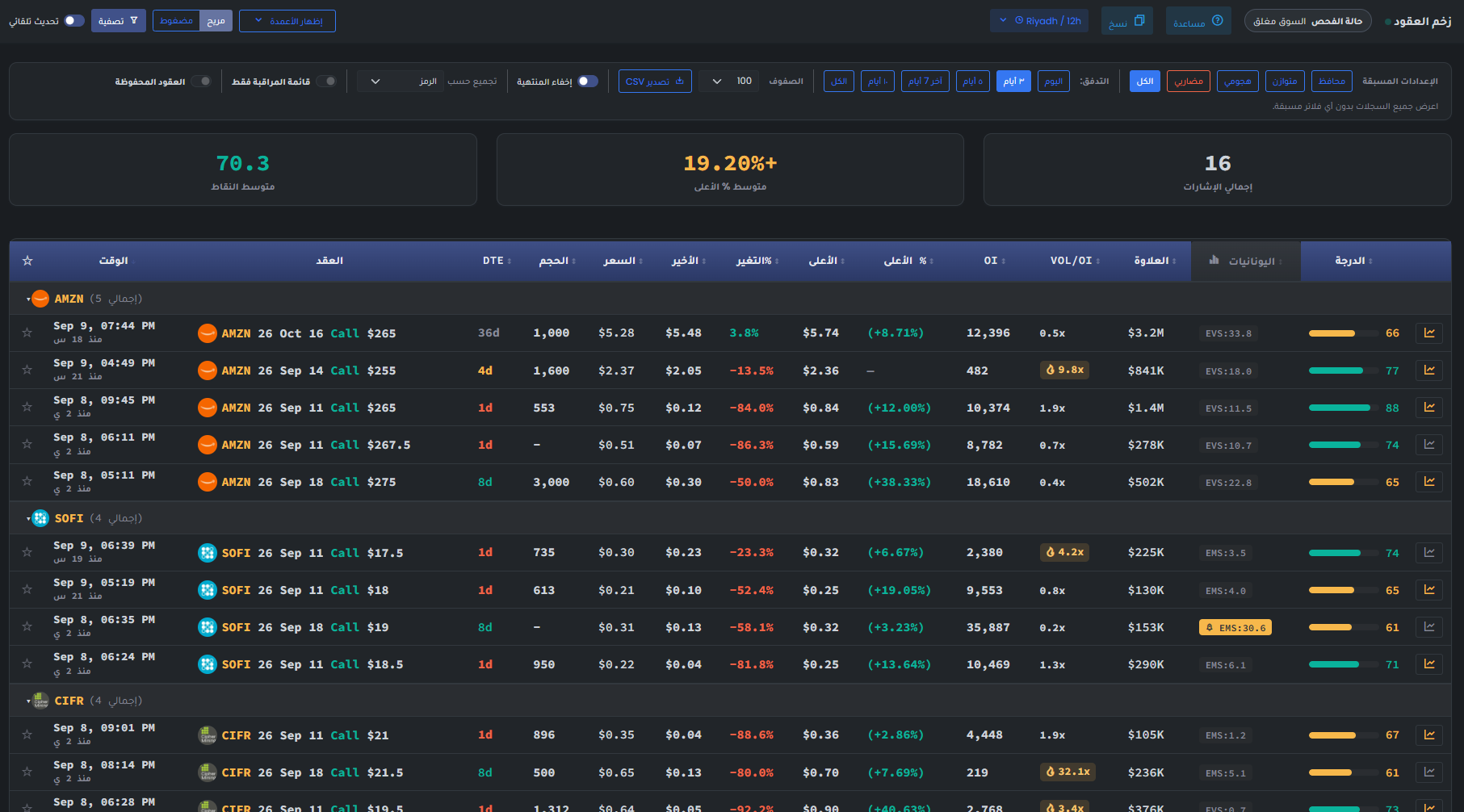
- Set the preset, flow lookback, row count, expired-contract choice, grouping, and watchlist scope before comparing scores.
- Use Total Signals to understand breadth, Avg Max % to review the filtered cohort's observed follow-through, and Avg Score to compare overall evidence quality.
- Read Time, Contract, DTE, and Size first so a near-expiry print is not compared blindly with a longer-dated position.
- Price is the detected price, Last is the latest available value, Chg% is the move between them, and Max/Max% records the best observed value after detection.
- OI, VOL/OI, and Premium describe liquidity and activity context. Very high VOL/OI can be informative but can also arise from a small OI denominator.
- EMS and EVS badges identify the model lens used for different maturity profiles; read them with the final score and the row chart, not alone.
Page components explained
Narrow the contract list
Start with a symbol or watchlist, then choose call/put and expiry. Add premium, volume, strike or days-to-expiry limits gradually. If the list is empty, relax one filter at a time. An empty list means no matches for these settings, not that the market has no opportunities.
Compare contract characteristics
These filters narrow contracts by the displayed scores, price sensitivity, volatility rank and leverage. Higher scores are not a measured chance of profit. Check the contract explanation and any missing-data notice before comparing two readings.
Events before expiry
Use earnings and dividend filters to find contracts near a company event. Check whether its date is confirmed or estimated and whether it falls before expiry. An event can change both the stock price and the option's implied volatility.
Your saved selection
Watchlist filters restrict results to your saved underlying stocks. Saved contracts restrict them to individual option contracts you bookmarked. These are different selections; a stock can have many strikes and expiries.
Data freshness
Read this status before treating a signal as current. A delayed feed or missing enrichment limits what the table can tell you. Refreshing the browser cannot restore missing source data.
Presets and grouping
Choose a preset, check its filters, and decide whether to group results or hide expired contracts. Grouping changes presentation; expired contracts remain historical information rather than current candidates.
Read a momentum contract
Check the radar signal, contract, expiry, quote and activity together. Score ranks the reading. Maximum move describes a recorded move and is not a realized return or a forecast.
Copy and export
Use the copy or export controls to review the selected results elsewhere. Keep the date, active filters and contract expiry with the figures so an old list is not mistaken for a current one.
Automatic refresh
Refresh checks for new readings. It does not make an old source current. Check the reading's timestamp and any warning before using it.
Language
Use the flag to switch the interface language. Check the currency shown on subscription and payment pages after changing language; trading symbols keep their original spelling.
Light and dark mode
Choose the appearance that makes text and chart details comfortable to read. Changing the theme affects the display, not the underlying data or signals.
Page layout
Use this control to change the available page layout. It changes how much space the interface uses, not the meaning of the displayed values.
Fullscreen
In the signed-in app, expand the site to gain more room for charts and tables. Use the control again or Escape to leave browser fullscreen.
Notification bell
Review recent notifications and their timestamps here. The badge counts unread notifications; it is not a count of unreviewed trading opportunities. Delivery channels and rules are managed in alert subscriptions.
Account menu
Open account settings, subscription details and other personal links here. Use sign out when you finish on a shared device.